Adding XMP-Metadata to the Document
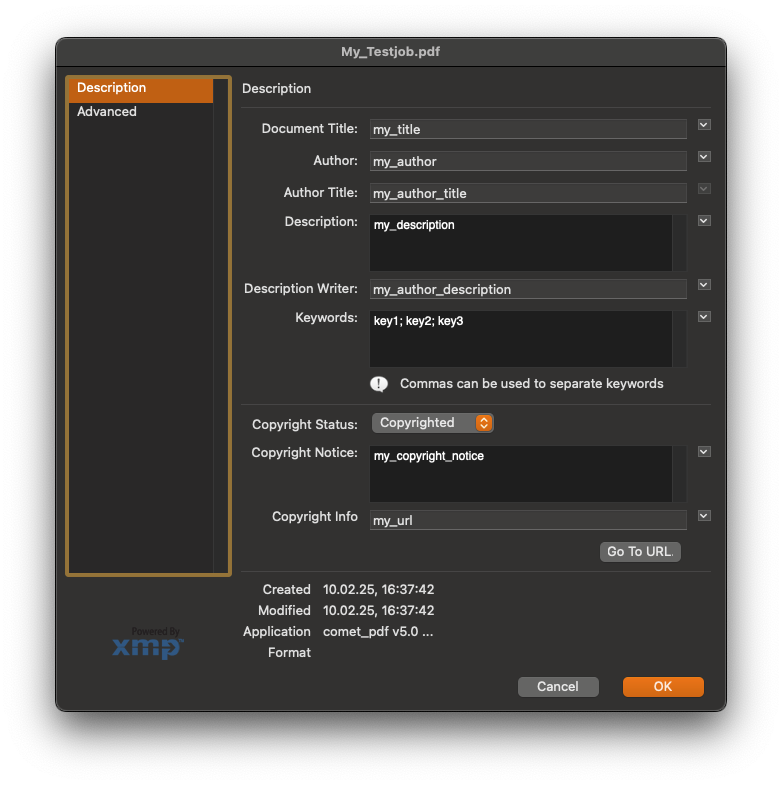
The Comet-PDF-renderer supports adding certain XMP-metadata to the document.
Set document metadata
To add metadata to the document, a function in the document-library can be used. This function takes a dictionary with the metadata-attributes as parameter. The dictionary's keys are predefined by comet. Entries with invalid keys are ignored.
metadata = {
    "kTitle": 		    "My Title",
    "kDescription": 	    "My Description",
    "kAuthor":		    "John Smith",
    "kAuthorTitle":         "John Smith's title",
    "kAuthorDescription":   "John Smith's description",
    "kKeys": 		    ["keyword1", "keyword2"],
    "kCopyRight":	    "Copyright: Me",
    "kCopyRightURL":	    "http://my/url",
    "kCopyRightState":	    1,
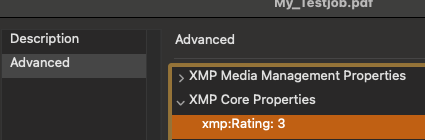
    "kRating":	            5
}

document_lib = comet.pyImport('[xml]/library/framework/document.py')
document_lib.set_document_metadata(attributes=metadata)
Retrieve Metadata from XML-input
It is possible to easily use data from the XML-datafile as metadata for the document. For this a function of the dataprovider-library can be used to retrieve values from the XML-datafile at these predefined keys. The resulting dictionary can then be passed to the document-library's function.
<data>
<item type="product" id="123">
    <item key="kTitle" content="My Title"/>
    <item key="kDescription" content="My Description"/>
    <item key="kAuthor" content="John Smith"/>
    <item key="kAuthorTitle" content="John Smith's title"/>
    <item key="kAuthorDescription" content="John Smith's description"/>
    <item key="kKeys" content="keyword1"/>
    <item key="kKeys" content="keyword2"/>
    <item key="kCopyRight" content="Copyright: Me"/>
    <item key="kCopyRightURL" content="http://my/url"/>
    <item key="kCopyRightState" content="1"/>
    <item key="kRating" content="5"/>
</item>
</data>
document_lib = comet.pyImport('[xml]/library/framework/document.py')
dataprovider_lib = comet.pyImport('[xml]/library/framework/data_provider.py')
DATAPROVIDER = dataprovider_lib.DataProvider()

metadata:dict = DATAPROVIDER.get_comet_pdf_metadata()
document_lib.set_document_metadata(attributes=metadata)
If metadata content is stored in attributes with different keys than the default ones, the function to retrieve the content can be called with a custom mapping of content-keys:
<data>
<item type="product" id="123">
    <item key="my_custom_title" content="My custom Title"/>
</item>
</data>
document_lib = comet.pyImport('[xml]/library/framework/document.py')
dataprovider_lib = comet.pyImport('[xml]/library/framework/data_provider.py')
DATAPROVIDER = dataprovider_lib.DataProvider()

metadata:dict = DATAPROVIDER.get_comet_pdf_metadata(content_keys={"kTitle":"my_custom_title"})
document_lib.set_document_metadata(attributes=metadata)
See here for more information: documents-library