Adding Bookmarks to the Document
To add bookmarks to the document, a simple function in the document-library needs to be called with a list of dictionaries as input. Each dictionary requires the page-index, bookmark-name and (optionally) the bookmark-index. For nested bookmarks, a further list of dictionaries can be added to a dictionary's "children"-property.
bookmarks = [
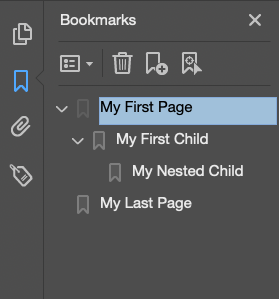
    {"page":0,"name":"My First Page","index":0, "children":[
        {"page":1,"name":"My First Child","index":1, "children":[
            {"page":2,"name":"My Nested Child","index":2}
        ]}
    ]},
    {"page":comet.gDocument.getPages()[-1],"name":"My Last Page","index":-1},
]
document_lib.set_bookmarks(bookmarks)
In the PDF-viewer the bookmarks show up in the bookmarks / table of contents-view:
info
See here for more information: documents-library